AI voiceover
How the AI writes a voiceover from your footage and notes, reads it in the chosen voice and builds the reel around it — for product footage and silent video.
On this page
AI voiceover turns a video without speech into a reel with a narrator. The AI looks at what happens in your footage, takes into account any speech in the material and your notes for the director, writes the voiceover text and reads it in the chosen voice. Then the director builds the reel around that voice: covers it with b-roll and photos that match the meaning, and the captions follow the voiceover's words.
It works well for product footage, unboxings, food, travel, behind-the-scenes — anything with pictures but no words.
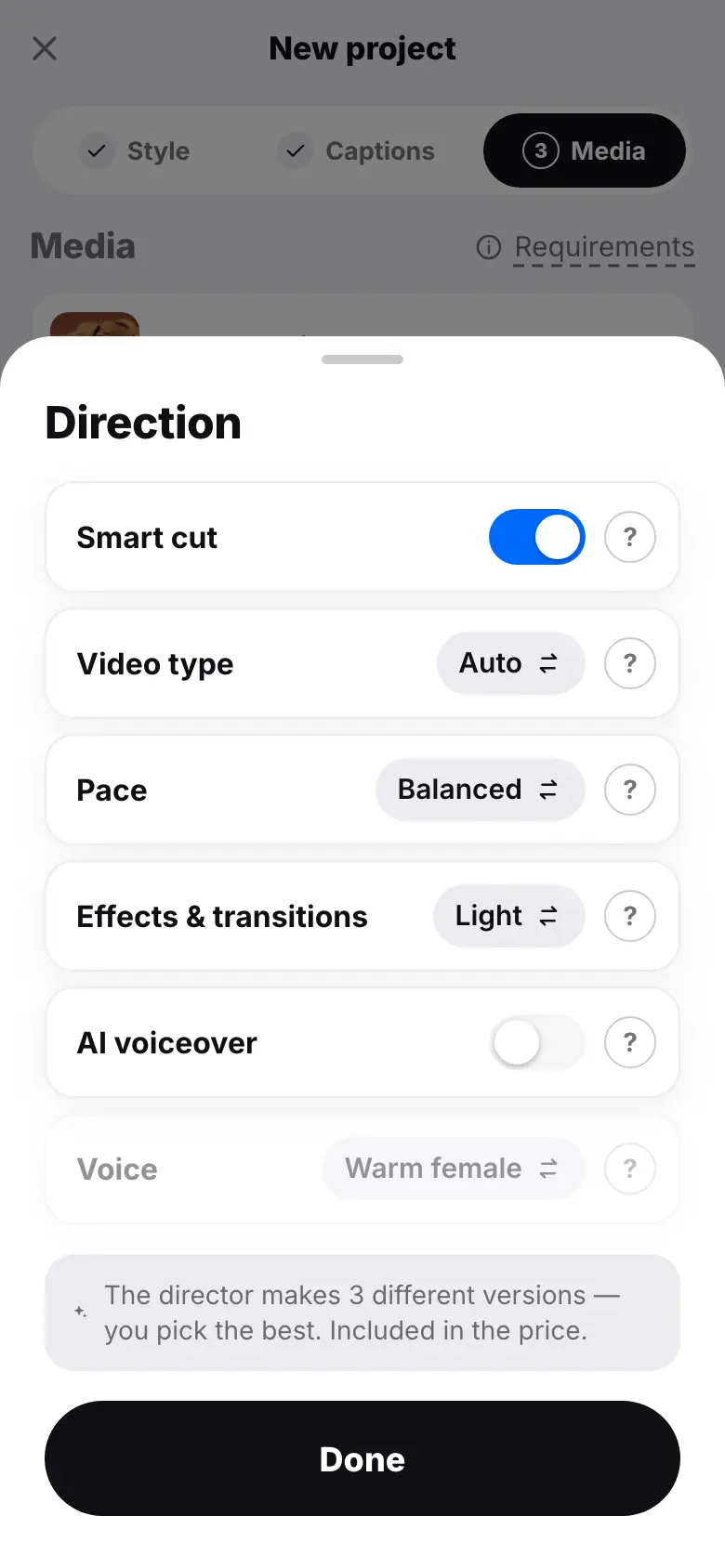
- Wizard step 3: tap “Smart cut” — the “Direction” sheet opens
- Tap “Video type” until it shows “Product / review” — the voiceover turns on by itself
- Tap “Voice” and pick “Confident male”
- Tap “Done”, then “Notes for the director” and pick “Focus on price and benefits”
- Tap “Create reel” — the run card shows the “Voiceover” stage
Turning it on
Open “Direction”
On step 3 of the new project wizard, tap the Smart cut row — the Direction sheet opens. The voiceover works only with smart cut on.
Turn on the voice
Turn on AI voiceover. The “Product / review” video type turns the voice on by itself, and “Aesthetic + music” turns it off: that kind of reel is built without text or voice.
Pick a voice
The Voice row cycles through the options: “Warm female” — friendly, conversational; “Soft female” — calm, for beauty and care; “Confident male” — energetic, for reviews and sales; “Deep male” — solid, for premium products. Tap Done.
Add notes
In Notes for the director describe what to talk about: the main benefit, the price, a call to action at the end. The AI takes the notes into account in the voiceover text too.
Start the montage
Tap Create reel. The run card shows the Voiceover stage.
What the text will be like
- Length — about 85% of the chosen reel length, 12 to 60 seconds of speech and no more than 900 characters. With the length set to “Auto”, the voiceover is planned for about 26 seconds.
- For “Product / review” — a hook with the main benefit, 2–4 concrete benefits visible in the frame and a short call to action.
- For other types — a short story: a catchy first sentence, what the viewer sees and why it matters, a clear ending.
- Only from the material: the AI describes what is visible in the footage or said in the material and your notes, and doesn't invent brand names, prices or promises. Want the price in the voiceover — put it in your notes.
- Language — Russian or English, matching the language of your notes or the speech in the material; Russian if unclear.
- The text is written for the ear: short sentences, no lists, emoji or hashtags.
Price
The voiceover is included in the montage price — 24 tokens, with no separate charge. If the voice is off, the Voiceover stage on the run card is marked as not needed.
What you get in the project
- The voiceover “Голос ИИ.mp3” appears in the project's Media section as a “Voice-over” material.
- In the editor, the voiceover is a set of clips with speech on the video track, and the picture over them comes from inserts of your b-roll and photos. The director stretches the inserts across the whole voiceover, so there are no gaps without a picture.
- Voiceover clips are trimmed and reordered by words like any speech, and the captions can be fixed (Clips, Captions).
- Editing caption text changes only the on-screen text — the voiceover itself sounds the same.
Tips
- Upload several different shots: a wide one, close-up details, the process — so the director has enough to cover the whole text.
- Background music goes well with a voiceover: upload a track to the materials — it will play quieter under the voice.
- Have your own voice? Upload the recording to the materials as audio: the AI recognizes it as a voice-over and builds the reel around it — then the AI voice isn't needed.
What's next
- How the director works — building the reel and its self-check.
- Smart cut and notes for the director
- AI avatar — when you need a speaking person on screen.